Surfing WWW With Your
Palm
Step 2 - Configuring Your Palm (cont'd)
Now we move on to your Network settings:
- Change to your Network settings
- Tap on the Menu silkscreen button, and choose New.
- At the Service field, type in a name for the Internet connection you want to you. Since I have a Pacific Internet account, I keyed in "Pacific Internet".
- At the User Name field, key in your UserID that is supplied to you. For those who are a bit clueless, this is the same as the ID you use when you want to connect to the Internet.
- At the Password field, key in your Internet password, the same one you use when you want to connect to the Internet. Once you have done this, this field should show "-Assigned-". If you prefer your Palm to keep asking for password everytime you want to connect to the Internet, then you should leave it blank, and this field will show "-Prompt-".
- At the Connection field, choose your newly created mobile phone connection, in my case, "Nokia 8210".
- At the Phone field, key in the same phone number you would use to dial if you were going to connect to the Internet normally at home.
One you have done all those, your screen should look similar to this:
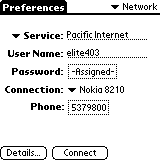
Network Preference Screen
If you've come this far without getting lost, congratulations! Effectively your Palm can now talk to your mobile phone! If you want to test the connection, activate the Infrared on your mobile phone (Nokia phones -> Menu option 9) and then tap on the Connect button as shown in the screenshot above. If you can successfully connect, it means all you need now is just the right software to do the things you want to do on the Internet, eg mail software to retrieve mail, and a web browser (not WAP browser) to surf the net etc. Heck you can even do IRC on your Palm if you wanted to :)
How do you tell whether the connection is successful? Simple.. you should be able to see a sequence of events happening like so:
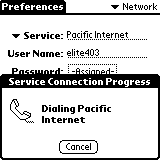
1. Dialing
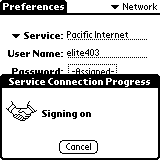
2. Handshaking
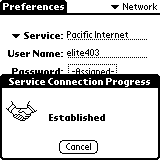
3. Connected!
What if the connection fails? Most commonly, you have entered the wrong USERID or PASSWORD for your Internet connection. If you can connect to the Internet with the PC, but you can't with the Palm, it's most likely a password error. Just make sure you have the capslock on or off depending on your password and userID requirements. It must be exactly the same as what you use on your PC.
Now, on to Step 3, where I suggest some software for you to try out for your newfound freedom to connect to the Internet anywhere! :)
 Previous Page |