The PalmOS Newbie Page
Hello hello!
Since you are here, I guess you rank yourself as a newbie to the world of PalmOS and probably PDA's in general. This page only focuses on PDAs running PalmOS.
Most people are practically clueless about their brand-spankingly new PDA. They won't even realise that every PDA runs an OPERATING SYSTEM (many people think that only computers have OSes. Then again, the Palm is actually a tiny computer anyway), much less which version it is *Grin*. Most people will be fine with the 4 standard software that comes with the PalmOS device, namely the DateBook, AddressBook, ToDo and MemoPad. Some slightly higher-end models come with Mail and Expense (Palm III, V and the newer m500 series). As far as I know, only Palm V and m500 series come with PQA ("Palm Query Application") support built-in. Most software using PQAs are for wireless connectivity, but PQA is not restricted to just that.
So now, for the rest of us, the tinkerers, we are never satisfied with just the 4 or 6 standard software that comes with the Palm, will we? No way Jose! We love to download stuff, try it on our Palms and crash them to kingdom come. Below is a list of what I think are pretty good to have, regardless of whether you are a newbie or a veteran. They appear in no particular order other than "which comes first" to my mind:
Arranger v1.52 |
||
| Category: | Outliner, Project Management |
 Arranger screenshot |
| Price: | US$19.95, Shareware | |
| Website: | http://www.olivebr.com/pilot.htm | |
| Review: | http://www.spug.org/reviews/rarranger.htm | |
| Download: | Olive Branch Software | |
| Remarks: |
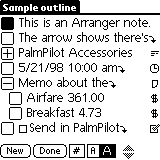
This is an outliner software. When I first got my Palm, I was thinking to myself - "There has to be a way to link an appointment in my DateBook to a ToDo and MemoPad". I make my Palm sound an alarm when I need to go to a meeting, make ToDo lists and take notes on the MemoPad during meetings. After that I may need to call up some people to get things done, and Arranger allows me to link the AddressBook into it too! It's cool to link all these apps together, and now I can just go to one software and see everything about a particular task or project that I need to work on. |
|
Datebk5 v5.1a |
||
| Category: | Datebook replacement |
 Datebk5 screenshot |
| Price: | US$19.95, Shareware | |
| Website: | http://www.PimlicoSoftware.com | |
| Review: | None | |
| Download: | Pimlico Software | |
| Remarks: |
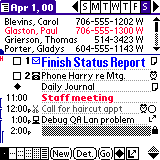
The standard Datebook app that comes with the Palm is pretty okay, for a start anyway. Sooner or later you will start to wonder about things like "How come there are NO categories in the Datebook like there are for other apps?" and "How do I hide just THIS KIND of appointments from the normal view, and only see them if I select a special view? It's so cluttered!!" Well Datebk5 handles these and other stuff. Personally I use it because it allows me to see both my TODO and APPOINTMENT lists on one convenient screen. Check it out for yourselves! If you don't really like Datebk5 much, you might want to check out the competition, Action Names. They do similar things, just very differently. |
|
Progect v0.26 |
||
| Category: | Project Manager, Outliner |
 Progect Screenshot |
| Price: | Freeware, OpenSource | |
| Website: | http://sourceforge.net/projects/progect | |
| Review: | None | |
| Download: | Progect Homepage | |
| Remarks: |
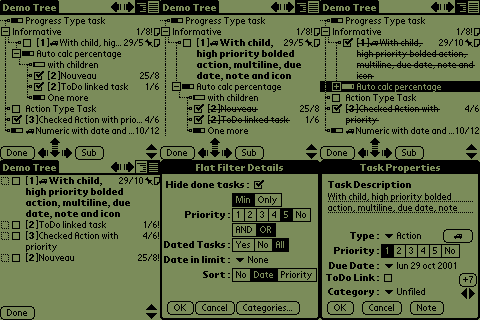
This is a pretty neat substitute for Arranger, should you decide not to purchase it. The price can't be beat - it's FREE. If you are a developer, you can even contribute to this software, since it's Open-Sourced. It offers similar features to Arranger, with the extra bonus feature of showing you Progress Bars for the tasks you need to complete. Hence, you can actually do real project management with this. I have both Arranger and Progect on my own Palm. |
|
Super Names v2.06 |
||
| Category: | Addressbook replacement | 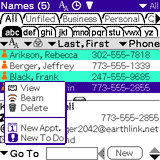 Super Names screenshot |
| Price: | US$19.95, Shareware | |
| Website: | http://standalone.com/palmos/super_names/ | |
| Review: | http://www.pdalive.com/supernames2.php | |
| Download: | Standalone Inc | |
| Remarks: | I like tabbed interfaces. Don't know why, but I do. Even my launcher is Handscape (I'll come to that later), which has lots of lovely tabs. I have this installed in my Palm for no other reason than it has this nice tabbed interface :) And of course, it is also able to sort the list by FIRST NAME, LAST NAME too. I think Palm's greatest oversight was that the default AddressBook could not sort this way, and insists on LAST NAME, FIRST NAME format. |
|
DiddleBug v2.53 |
||
| Category: | Sketch Pad |
 Diddlebug screenshot |
| Price: | Freeware, Open Source | |
| Website: | http://sourceforge.net/projects/diddlebug | |
| Review: | None | |
| Download: | DiddleBug Homepage | |
| Remarks: |
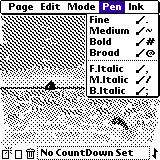
One of the things I felt that Palm really lacked was a sketch pad. Sometimes, for example, when you're on the phone and you need to take a number down, and lo and behold! All your pens and paper have mysteriously disappeared or somehow just got up and sat just outside your reach. With a freehand sketchpad you can write stuff down in your own handwriting without actually needing to do Graffitti®. Not only that, you might want to jot down a quick handwritten note to yourself to remind yourself to do something, and guess what... you can set ALARMS on this thing! Useful for those things you don't need to put into the ToDo lists. I also find this useful in many cases where I needed to draw a rough map to explain to some lost soul how to get to where they wanted to go. Who needs a pen and paper? *Grin* |
|
Handscape Pro 3.0.1 |
||
| Category: | Application Launcher |
 Handscape Pro screenshot |
| Price: | Free or Shareware, US$19.95 | |
| Website: | http://mobimate.register.co.il/handscape/index.shtml | |
| Review: | None | |
| Download: | Mobimate Homepage | |
| Remarks: |
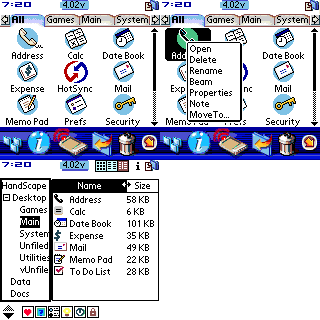
If you can still find Handscape Lite, the freeware version, you're one lucky guy/gal! As far as I can tell, seems that MobiMate has decided to pull the Lite off the webpage and make everyone pay for the Pro version. As you can see from the screenshot, it has tabs too. Did I mention I like tabbed interfaces? I didn't? Okay I'll mention it here... I LOVE TABBED INTERFACES! :) As an alternative to Handscape if you can't find the free version and you want a free launcher, get Launcher III from Benc Software. It too has tabbed interface, but I didn't really like the way it looks. |
|
FunSMS 2.0.2 |
||
| Category: | Infrared, mobile phone |
 funSMS screenshot |
| Price: | US$29.00 or DM79.00 (that's Deutch marks, currency of Germany) | |
| Website: | fun4palm.com | |
| Review: | http://www.spug.org/reviews/rfunsms.htm | |
| Download: | fun4palm.com | |
| Remarks: |
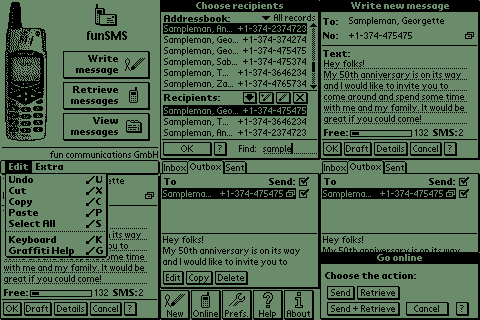
Now this is probably the single most useful application ever created for the Palm. What does it do? Simple. It sends and receive mobile phone SMSes. Yes, that's right! I don't thumb-cycle on my Nokia phone to send SMSes. I can Graffitti® it on my Palm, and shoot it off via Infrared to my phone and off it goes to my friends! Similarly, if I receive SMSes on my phone, I don't even need to read them on my phone. All I need to do is just get this app to retrieve the messages from the phone and I can read/reply at leisure. Plus, with this app, you can send the same message to as many people as you want, with just one connection! Try that with a phone! :) |
|
BackupBuddy v1.4VFS |
||
| Category: | Backup |
Sorry no Palm-based screenshots
available. Click
here to see screenshots in Windows
|
| Price: | US$29.95 | |
| Website: | Blue Nomad Inc | |
| Review: | Cool Tool Awards | |
| Download | Blue Nomad Inc | |
| Remarks: |
This is technically not a Palm software. It does not run on your Palm, but on your DESKTOP (Windows or Mac etc). What it does is simple - make a snapshot of your Palm everytime you Hotsync™, so that should your Palm crash, or should you ever do a hard reset, you don't need to re-install everything or re-key all your non-standard application data. I can't even begin to tell you how many times BackupBuddy saved my data. The very first time was when I was tinkering around with my Palm, downloading and installing lots of weird software to try. Of course before doing that I did a Hotsync™ just in case. As expected, one of the software I loaded was badly written and locked up my Palm. I had no choice but to do a hard reset. After the reset, all I needed to do is to pop the Palm back into the cradle, press the button and everything is back the way it was, before all my "experiments". The most recent time BackupBuddy saved the day was when my Palm died on 19 Dec 2000. I went out to buy a new Palm and BackupBuddy "restored" everything on the new Palm without a flinch. Since then (touch wood), there has been no major accidents that caused my Palm to lose data, but of course I still use BackupBuddy daily. You never know when the day will come when your Palm might encounter memory failure! :) |
|